
Changelog

What's new in Kleo

Everything we ship, as we ship it. New features, improvements and fixes, straight from the team.

New

Repost your best-performing posts

Haven't posted in a while? Find the posts that already did best for you in Analytics, sort them by followers gained and schedule them to go out again.

If you haven't posted in 3 months, one of the easiest ways to get going again is to repost something that already did really well. Most people who see it now won't have seen it the first time, and a post that worked once has a good chance of working again. Just check it's still relevant first: the numbers, the dates and anything that has changed since you wrote it.

Find your best posts

  1. Log in to Kleo
  2. Go to Analytics
  3. Scroll to the bottom of the page
  4. Here's all your best posts, with the numbers for each one

Sort by followers gained

Use the sort menu above your posts to order them by impressions, reach, engagement rate, saves, link clicks or Followers gained. Followers gained is the interesting one. It shows you the posts that actually grew your audience, not just the ones that got the most likes, so they're usually the best ones to post again.
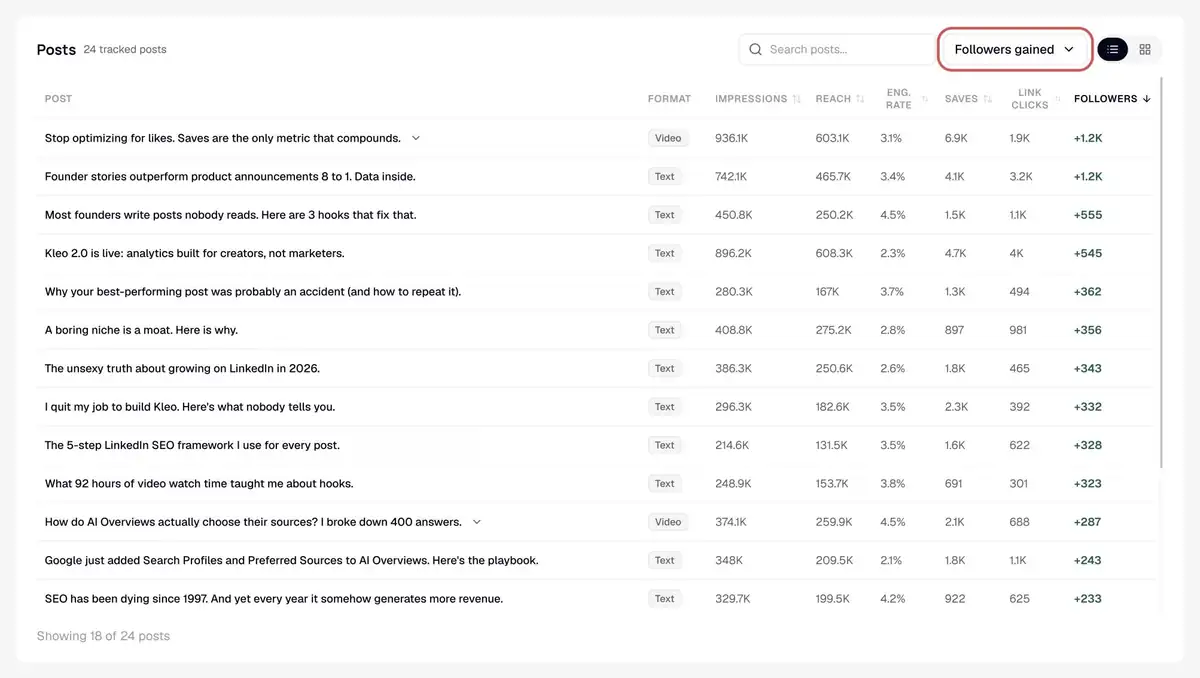
Posts sorted by Followers gained

Schedule it again

Click any post to open its full breakdown, then click Schedule again. Pick a date and time, and Kleo will post it again for you.

Would you rather write something new? Draft a similar post takes the same angle and helps you write a fresh version of it.
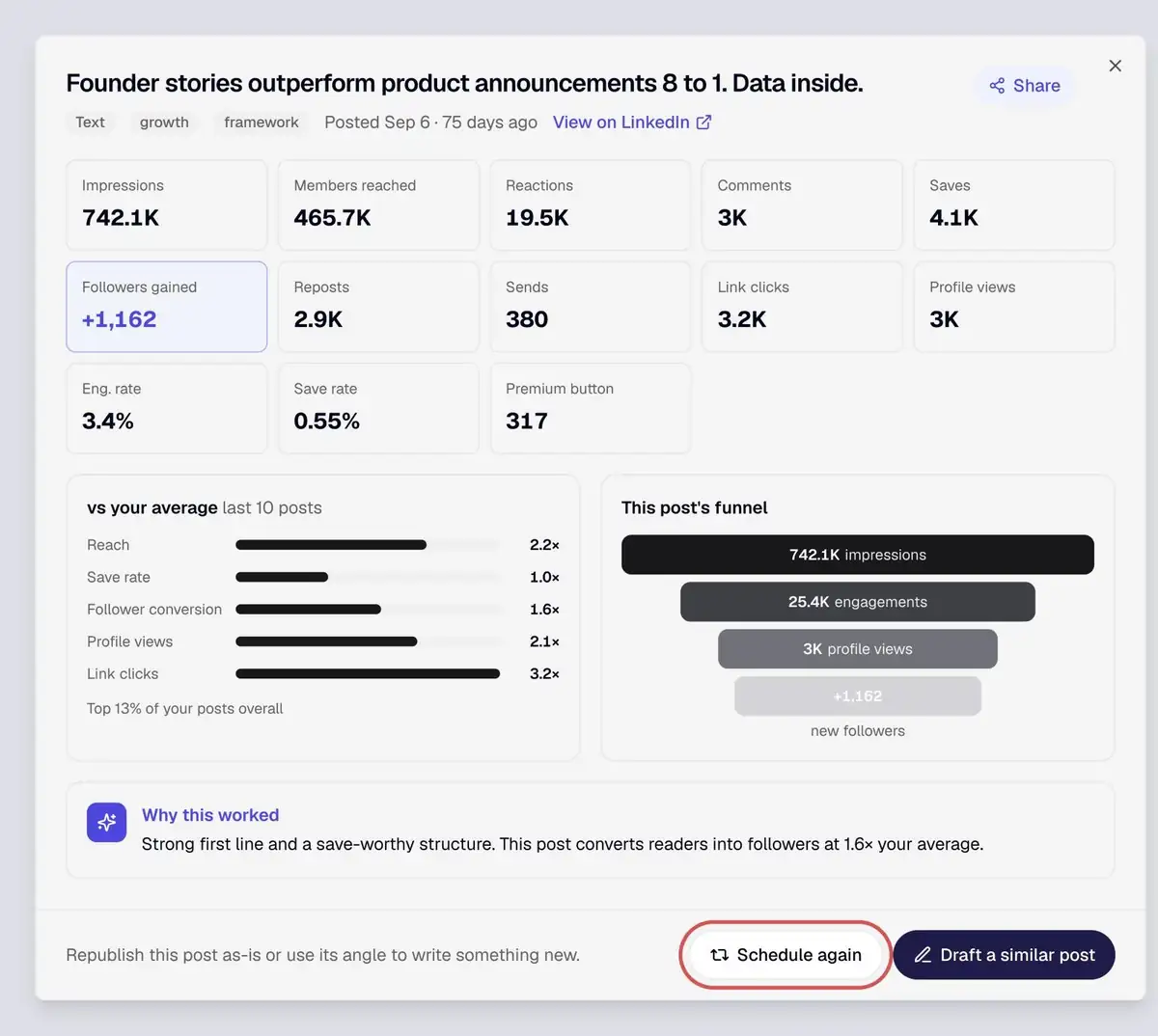
A post's breakdown with Schedule again

Head to Analytics to find your best posts.
New

New filters and outlier scores in Inspiration

Inspiration now has a full filter panel, four quick presets and an outlier score on every post, so you can find the posts that really outperformed and learn from them.

New filters and outlier scores in Inspiration

We think the best way to go viral and do well on LinkedIn is to find posts that have already done well, take their format and put your own spin on it. That's exactly what Inspiration is for, and it just got a lot better.

Inspiration now has a full set of filters, four quick presets and an outlier score on every post, so you can quickly find the posts that did best and use them as the starting point for your own.

Start with a quick preset

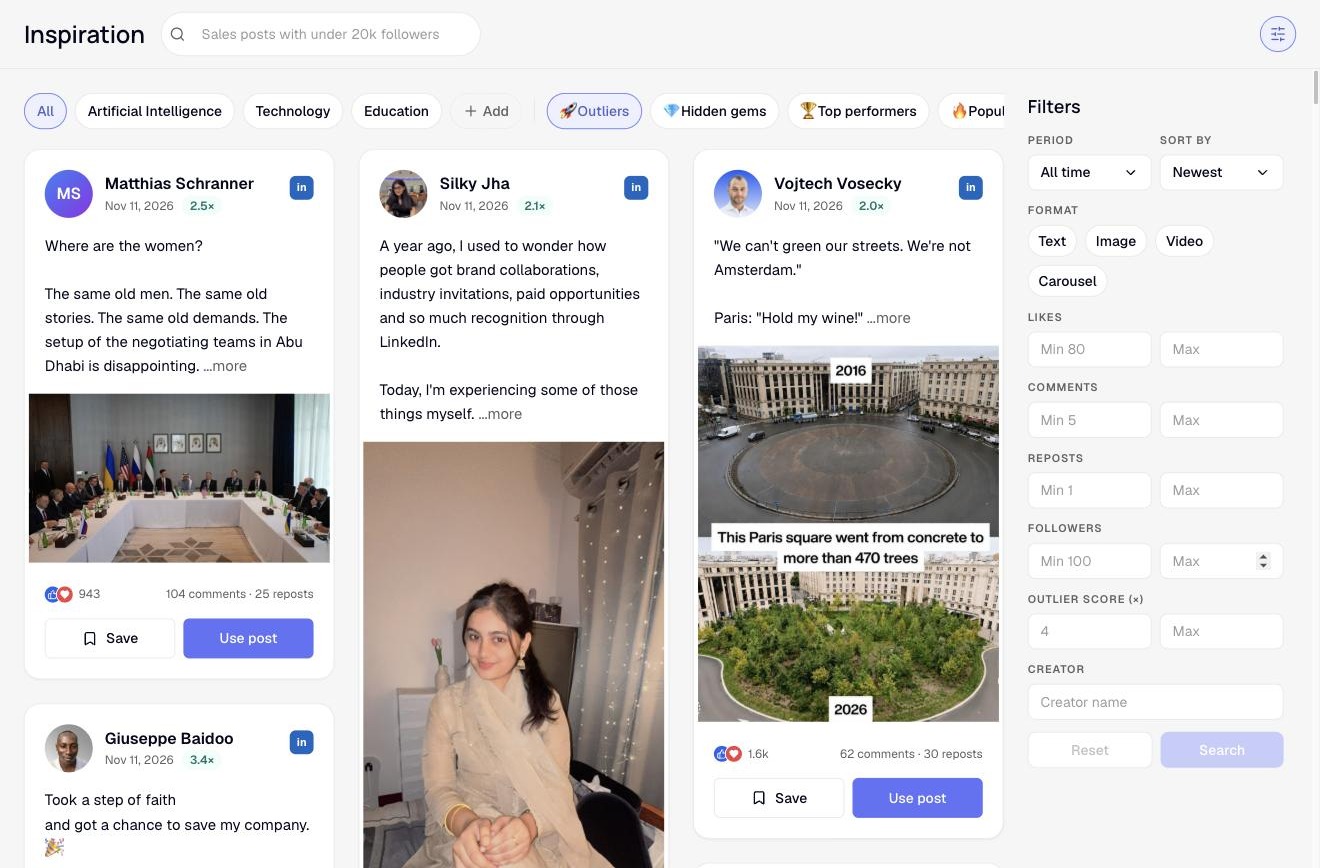
Along the top of Inspiration you'll find four presets that do the filtering for you:

  • Outliers: posts that got at least 2× their creator's usual engagement
  • Hidden gems: strong posts from creators with under 20,000 followers
  • Top performers: the highest-engagement posts in the period you've picked
  • Popular: what Kleo members are using and saving right now

The Outliers, Hidden gems, Top performers and Popular presets

Filter by exactly what you want

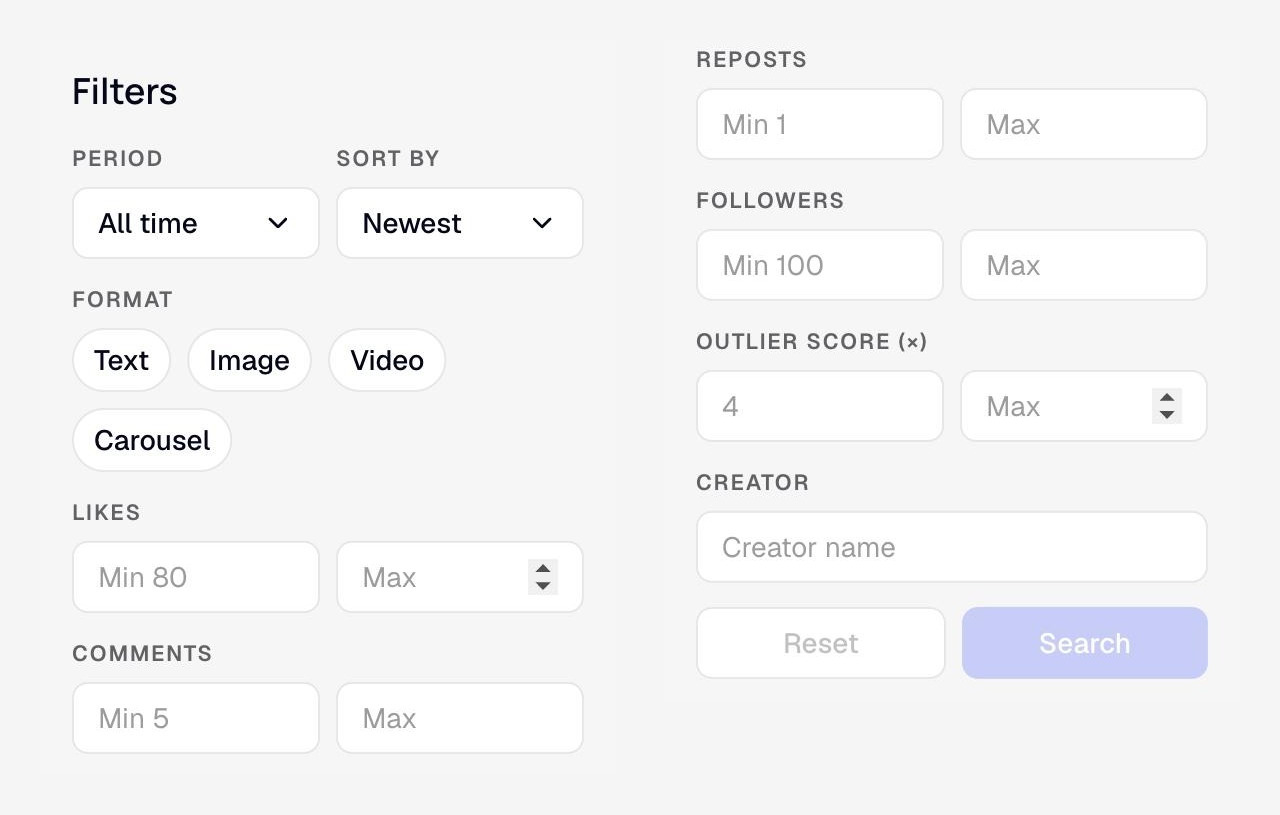
Click the filter icon in the top right of Inspiration to open the new filter panel. You can narrow posts by:

  • Period and sort order, including newest, most likes, most comments, most reposts and highest outlier score
  • Format: text, image, video or carousel
  • Likes, comments and reposts, with a minimum and maximum for each
  • Creator followers, so you can focus on accounts around your size
  • Outlier score
  • Creator name

Hit Search to apply them, or Reset to clear everything in one click.

The Inspiration filter panel

What the outlier score means

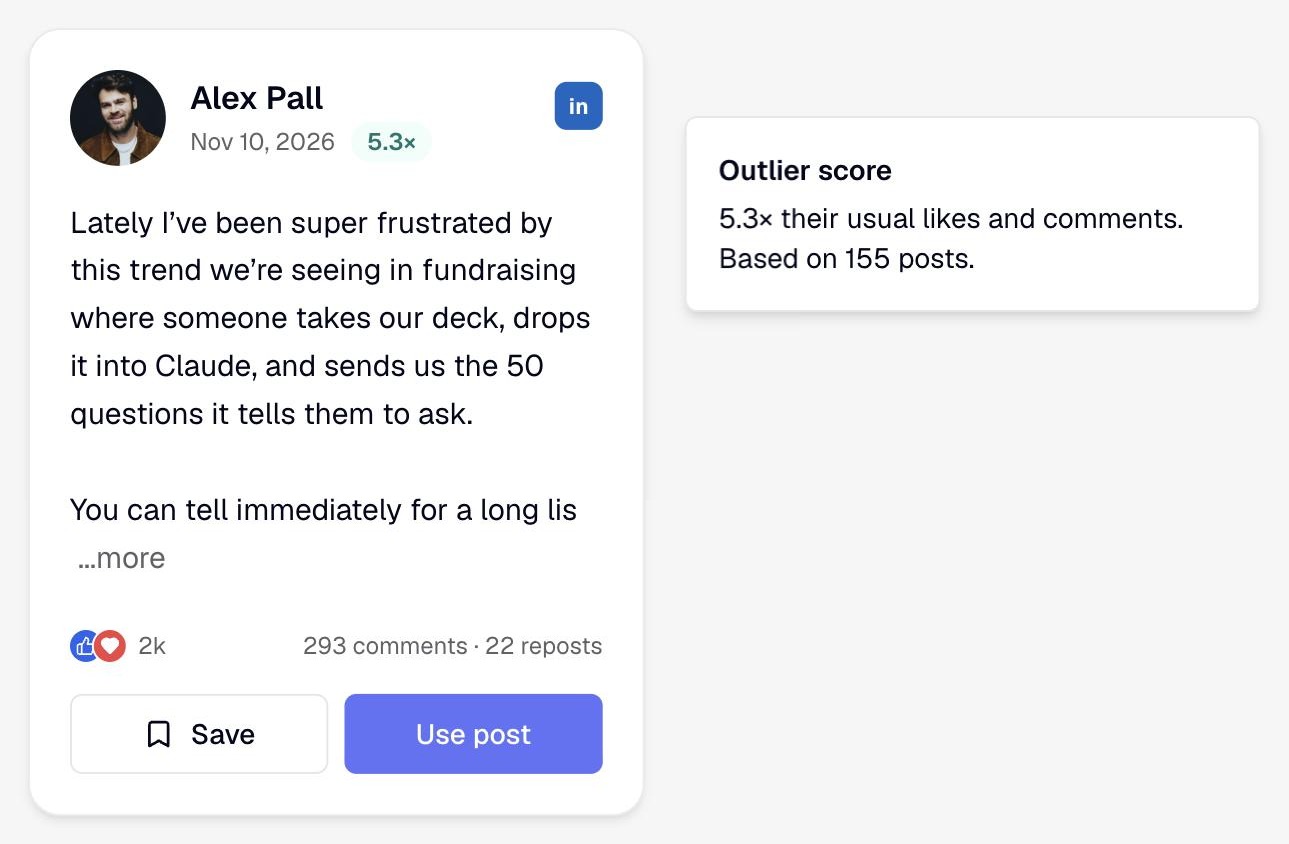
Every post now shows an outlier score next to its date. It compares the post's likes and comments with what that creator usually gets, based on their other posts. A score of 5.3× means the post did 5.3 times better than normal for them.

  • Green means it beat their usual results
  • Grey means it did about as well as normal
  • Amber means it did worse than usual

Click any score to see how it was worked out.

A post with a 5.3× outlier score and its explanation

How to use it

Big creators get big numbers on almost everything, so raw likes don't tell you much. The outlier score shows you what actually worked:

  1. Pick the Outliers preset, or sort by Highest outlier score
  2. Set Creator followers to accounts around your size
  3. Open the posts with the highest scores and look at what they did differently: the hook, the format, the topic
  4. Hit Use post to write your own version in Kleo

A 5× post from someone with 3,000 followers will teach you far more than an average post from someone with 300,000.

Search the way you talk

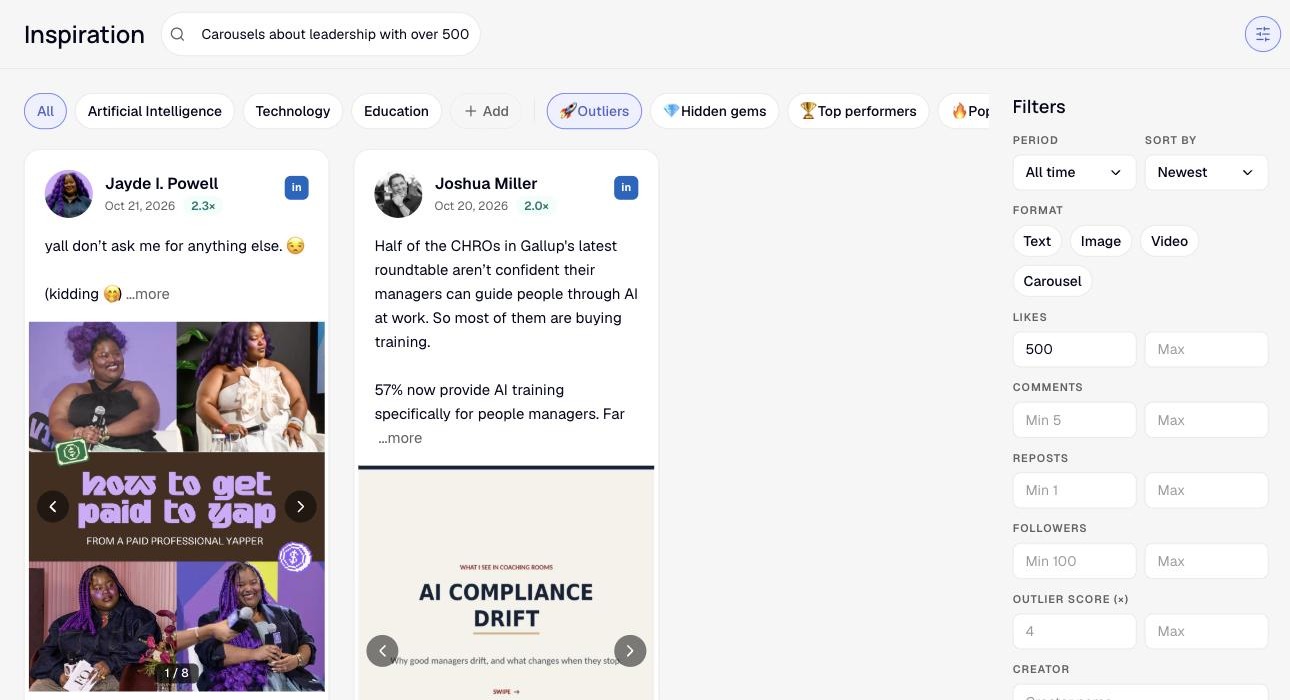
You can also just type what you're after, like "Carousels about leadership with over 500 likes", and Kleo fills in the filters for you.

A plain-English search filling in the Inspiration filters

Head to Inspiration to try it.

New

Introducing the Kleo changelog and roadmap

Every Kleo update now lives in one place. See what we've shipped, what we're building next, and get a heads-up in your notifications whenever something new lands.

We ship improvements to Kleo every week. Until now, there was no single place to see them, so unless you were watching closely, you'd have missed most of them. That changes today.

Everything we ship, in one place

This changelog is now the home of every Kleo update. New features, improvements and fixes will all be posted here as they go live, with a clear explanation of what changed and how to make the most of it.

See what's coming next

We've also opened up our roadmap, so you can see exactly what we're working on:

  • Considering: ideas we're weighing up
  • Planned: features we've committed to building
  • In progress: what the team is building right now
  • Currently testing: features that are almost ready to ship

Click any card to see what the feature does and why we're building it.

Never miss an update

When we post something new, you'll see it in your Kleo notifications. Open the bell and the Changelog will show that a new update is waiting for you. The Roadmap is always one click away in the same place.

What's next

Some of the features on the roadmap are already being tested. Keep an eye on this page, because they'll be announced here first.